Odisha Voter List 2026 – CEO Odisha Voter List 2002 PDF Download
The election commission of Odisha published the latest voter list of 2026 for Odisha online and the Odisha Voter E-rolls 2002 SIR List.
Citizens of Odisha can download the latest to the list and check their name from home. On the CEO Odisha website, the Voter Electoral Roll 2002 list is available for citizens. Anyone can download this 2002 voter list in PDF format.
The voter verification is now important and required by the Election Commission of India. Every citizen of Odisha must verify their voter ID by the following guidelines provided by the election commission.
Electoral Roll SIR 2002 Odisha
The citizens of Odisha can check their voter list by district-wise; the Electoral Roll of SIR 2002 is already published on the portal. People of Odisha can check their name on this list according to their district and AC name.
The election commission is doing a survey by visiting every house in the state and checking the household and other eligible voters and their voter IDs. After verifying all the documentation, the updated list with the latest voter details is published on the CEO Odisha website.
FORM 6
Application for inclusion of name in the electoral roll
FORM 6A
Application for inclusion of name in electoral roll (for NRIs)
FORM 7
Objection to inclusion of name in the electoral roll / Request for deletion or correction
FORM 8
Application for correction of details in the electoral roll, EPIC details update, and PwD-related entries
You can submit all these forms to your BLO (Booth Level Officer) or via the ECINET app.
How to Apply for a Voter ID Card in Odisha?
Any citizen of India who is 18 years of age or above can apply for a voter ID card in Odisha. A new voter can apply online from home or can also apply offline by visiting the nearest Election Commission office. Below is the simple and easy online method to apply.
Go to the Official Portal:
The applicant has to visit the National Voter Service Portal (ECINet): https://voters.eci.gov.in/. On this portal, voter ID card applications are accepted online for all states, including Odisha.
Log in to Your Account:
After opening the portal, click on the “Login” button to log in to your account. To start the application process, login is required.
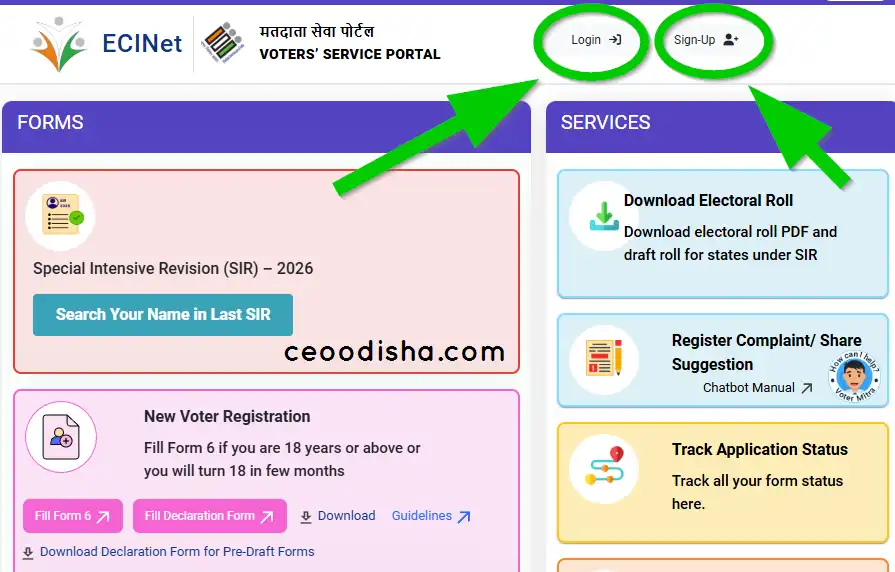
If you are not registered, click on the “Sign-up” option to create a new account.
Create Your Account:
If you are a new user, first you need to create an account on the portal.
Go to the “Sign-up” option and open the registration page. Enter your mobile number (email ID is optional), fill in the CAPTCHA code, and click on Continue.
An OTP will be received on your registered mobile number. Enter the OTP and click on the “Verify and Login" button to go to the next step.
Go to Form 6 (fill online):
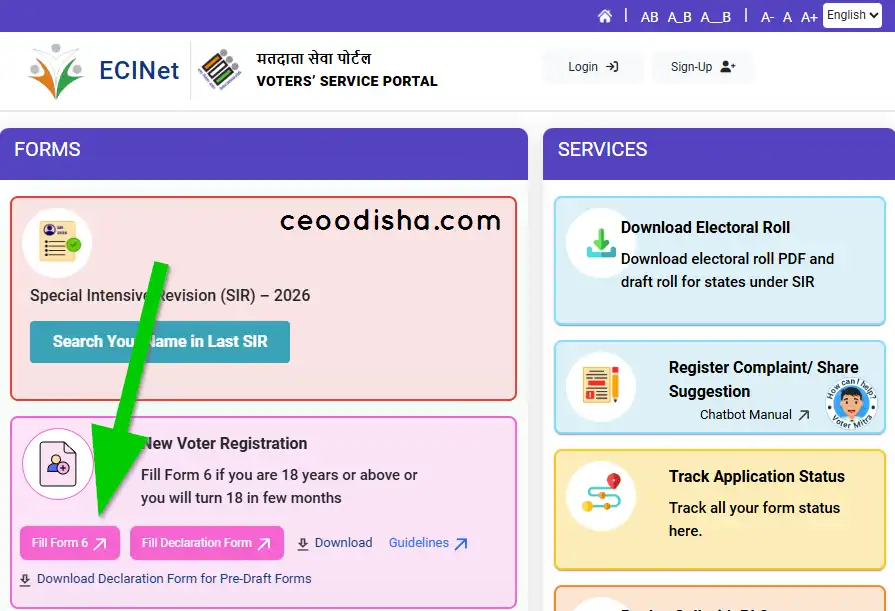
After successfully logging in, go to the “Fill Form 6” option under the “New Voter Registration” section.
Form 6 is for citizens who are 18 years old or who will turn 18 in the next few months.
Fill out the Application Form for New Voters:
Now you need to fill out the complete application form carefully. In this form, you have to provide all required details for the new voter registration, such as
- Select State, District & AC (Odisha)
- Personal Details
- Relative Details
- Contact Details
- Aadhaar Details
- Gender
- Date of Birth Details
- Present Address Details
- Disability Details
- Family Member Details
- Declaration
- Captcha code
After entering all the details correctly, click on the “Preview and Submit” button to complete your application.
After submitting the application form, you will receive the application details along with a reference number on your registered mobile number. This reference number helps you to check your voter ID application status online and also to download your voter card once it is approved.
Helpline number
| Address: Office of the Chief Electoral Officer, Odisha Block 'C', 4th floor Janata Bhawan, Dispur, Guwahati Odisha 781006, Odisha |
| Contact Number: 1950 (From 10:00 am to 05:30 pm) |
| Phone No.: 1800 3451947 |
| Email: ceo_Odisha@eci.gov.in |
| Official Portal | ceoodisha.nic.in |
FAQ for CEO Odisa 2026
What is CEO Odisha?
What is ceoodisha.com?
How can I check my name in the Odisha voter list?
How do I apply for a new voter ID card?
What documents do I need for voter registration?
Proof of age
Proof of address
A recent passport-size photo
Common documents include an Aadhaar card, birth certificate, passport, or utility bills.